A perfect example of how IDEA *just works*

People I know who use Eclipse ask me why I use IntelliJ IDEA, when Eclipse is really good and free. Well, it’s little gems like the following that put IDEA miles above anything and everything else. And you don’t even have to know what all the gems are, they just appear when they need to.

I was writing some unit tests for some new code, and one of my tests was failing. I had hit the “run tests” button, and I had got a red-bar. So I clicked on the failing test, and this is what I saw [this is sample code to protect the guilty]:
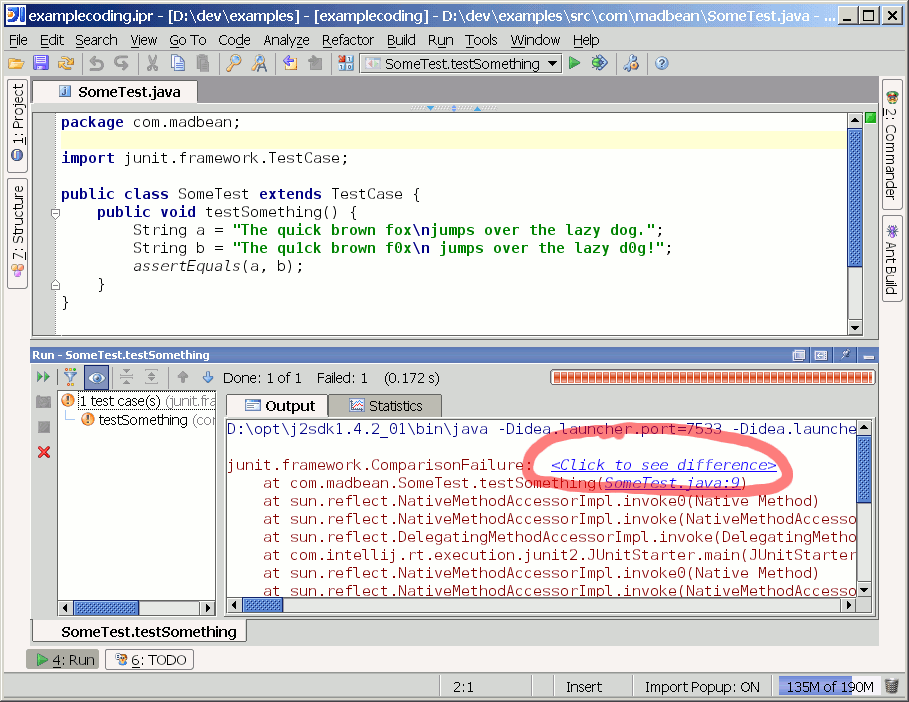
Okay, a comparison failure (two multi-line strings were were not asserting-equals). But wtf… Click here to see difference? Normally you get a truncated version of the expected and actual strings. Clicking there produced:
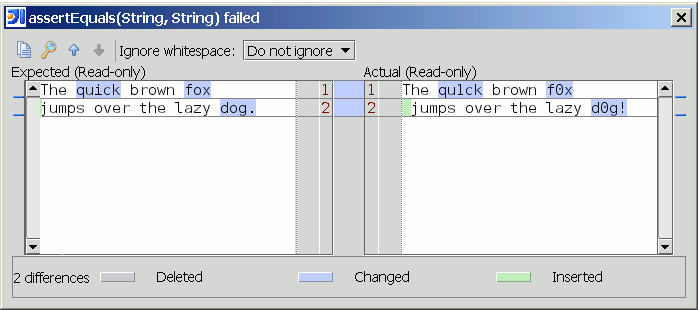
Oh… my… god! A freaking ediff of the two strings. That is exactly what I wanted, and I didn’t even know it. IDEA simply activated one of its little gems, because it would make my life easier.

IDEA is just good. My only gripe is that new logo: I keep alt-tab-ing past it. My eye/finger memory hasn’t caught up yet.

7 Comments

  1. Posted August 20, 2004 at 8:29 am | Permalink

    Eclipse does that too… double-click on the comparison failure and you get a similarly-highlighted diff. Although I must say that the IDEA hyperlink is a lot more discoverable than the eclipse equivalent

  2. Michal Plechawski
    Posted August 20, 2004 at 10:26 am | Permalink

    Eclipse 3.0 has similar feature too. I have just switched from Eclipse 3.0 to IDEA 4.5 and I must say there are a lot of small gems in Eclipse that make it pleasure to develop with that I miss in IDEA. But looking objectively, both tools are really strong and equally polished, but IDEA do have a little bit more features.

  3. Laurent
    Posted August 20, 2004 at 10:37 am | Permalink

    As this article pointed out this is not the only gems of IDEA there are plenty of the same kind of features that are just making your life easier and allow you to focus your mind on what you want to code and not how to use your IDE.

    I now use Eclipse for my every day work because I’m forced to, but I miss a lot IDEA.
    No complex wizard, just a few keybord strokes and the job is usally done.

    Cheers

  4. Posted August 20, 2004 at 2:10 pm | Permalink

    Agreed Laurent! One of the biggest surprises for me was the diff screen you see when looking at changes to a source file in CVS. We all know about differencing a current file with the file stored in CVS. However, IDEA goes the extra step and allows you to see each individual difference. On the left side of the screen where the line numbers are, if you click on the colored bars (simular colors to the diff colors) you will see a small pop-up of icons, one allows you to see the differences between the two versions for just that change.

    I have been using IDEA since 2.6x, I tried JBuilder 6, 9 and X, Eclipse 2.x and 3.x. Of all those, IDEA is still the best. It requires a machine with a little more muscle maybe, but it’s well worth it. The thing practically programs itself!

    My biggest complaint with Eclipse is it’s "projects". They don’t treat projects the way other development environments do. It really made it hard for me to get my head around what it wanted me to do with my existing project.

    Every upgrade has more and more features that I wish were in other development environments like C/C++. I know I haven’t found all the cool things that IDEA will do.

  5. Posted September 23, 2004 at 3:16 pm | Permalink

    I get those experiences all the time with Idea. Somehow this IDE just reads your mind. I use Eclipse a lot too and I think its strong but I haven’t had equivalent WTF or "I’ll Be Damned" (IBD) experiences. I find myself looking for (and finding mostly) Idea features in Eclipse.

  6. Posted September 29, 2004 at 4:33 am | Permalink

    I use Idea 3.0 and briefly tried Eclipse which I consider the second best. I’m not really looking for cool features but for the ability to handle projects comprised of 50K+ lines of code and Megs of third party libs in the debugger. Nothing comes close to Idea in terms of speed and reliability.

    I have been an user since 2.5 and I have to say this IDE has many minor bugs in all versions.

  7. O.T.
    Posted August 17, 2005 at 6:41 pm | Permalink

    I’ve used both IDEA (3.0 to 5.0) and Eclipse (3.0, 3.1) extensively and also tried most other Java IDE’s. In my opinion the 2 best
    Java IDE’s are IDEA and Eclipse. I really wanted to like Eclipse. It is free and it has a lot of features. When it comes to productivity
    though it can’t beat IDEA, at least not for me. Eclipse just doesn’t work the way I do. It keeps getting in my way instead
    of streamlining my work like IDEA does. It’s the tiny things that make a huge difference for me.

    I personally code a lot by hand, I hate most wizards. Just give me a keyboard shortcut. IDEA is ideal for that. And it keeps
    thinking ahead. It always gives me options just a bit ahead of time instead of after the fact (which happens a lot to me in
    Eclipse). Sometimes I think it’s reading my mind. And like others mention it often gives you those “WTH? I didn’t know it could
    do that!” moments. The best part is that you don’t have to search for the things it can do. IDEA will reveal them when they
    are of most use to you. IDEA truly makes working with it fun. I can work with Eclipse but at best it’s ok and often it just gives
    me a headache.

    There are a lot of people comparing the two programs and everyone will have their preference which is good. It keeps things
    competitive as well. What I do notice though is that most Eclipse users mention things like “but Eclipse can do that too, for FREE!”.
    Yes it can do most things IDEA can, in some cases a bit more, in some a bit less. But most IDEA users don’t pick IDEA over Eclipse
    because it has more features, they pick it because the way it works is much better (for them at least). IDEA is the first IDE for me
    that gets out of my way and lets me do what I want….the way I want it.

    Both Eclipse and IDEA have all the major features you’d want, you can do your job with either one. Eclipse is great and a lot of people
    love it, I’m just not one of them. Personally I want to get the job done fast and without frustration and for me that means using IDEA.

Post a Comment

Your email is never shared. Required fields are marked *

*
*